bolor.
NielsenIQ DiscoverLegacy analytics modernization

Modernizing a legacy data-selection experience.

NielsenIQ Discover’s data selector brings complex analytical rules into a compact workspace. The modernization challenge was to make selections, comparisons, and reused definitions easier to understand while preserving the system’s analytical depth.

Product
NielsenIQ Discover
Focus
Selection structure, comparison scope, and reuse
Project context
Legacy analytics modernization
Central decision
Make the comparison base explicit

The analytical context stays in view.

The selector sits beside the workspace. Its compact panel groups characteristics, exposes comparison functions, and keeps the prompt controls close to the selection.

Make the system’s logic visible in the experience.

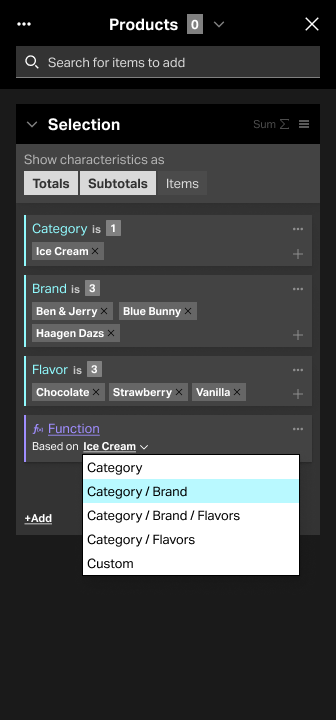
In the example, a selection combines the Ice Cream category, three brands, and three flavors. Adding “All Others” introduces another question: other items within which base?

The modernization challenge

A data selection carries more than its chosen items. Characteristics, values, aggregation, saved definitions, and dependent facts all affect its meaning. Modernizing the interface meant giving those relationships a clear hierarchy and helping analysts understand the consequence of each choice.

The redesigned function card and contextual explanation keep comparison scope close to the selection. Analysts can inspect what “All Others” includes at the point where they configure it.
The spatial constraint

The 336-pixel sidepanel keeps analytical work beside the main canvas. A fixed header anchors prompt actions while a scrolling area contains selection groups, characteristic cards, and function controls.

The hierarchy separates prompt-level actions, selection-level controls, and card-level choices. Each layer has a consistent place, so a dense analytical task can remain readable as the selection grows.

Build a precise selection

Find characteristics and values, then keep their relationship visible as the selection grows.

Understand the comparison

See the base used by “All Others” and understand what the current selection excludes.

Reuse with control

Distinguish a saved definition from a changed instance and understand the reach of an update.

Three analytical needs guide the modernization: precise selection, understandable comparison, and controlled reuse.

From finding an item to trusting the selection.

The analyst moves from finding an item to understanding and reusing a precise selection. The interface needs to keep the selection’s meaning visible as values, comparison rules, or datasets change.

  1. 1 · FindSearch or browse

    Enter the add screen; find a characteristic or value.

  2. 2 · SelectChoose values

    Add category, brand, and flavor values to the group.

  3. 3 · OrganizeInspect the group

    Review cards, display options, and aggregation controls.

  4. 4 · CompareSet the base

    Use “All Others” and inspect its scope explanation.

  5. 5 · CheckResolve constraints

    Address limits, unavailable values, and dependencies.

  6. 6 · ReuseSave and update

    Manage linked definitions and modified instances.

The task flow connects finding and selecting items with comparison, recovery, and reuse. Each stage needs clear state and a predictable next step.

“All Others” needs an explicit base.

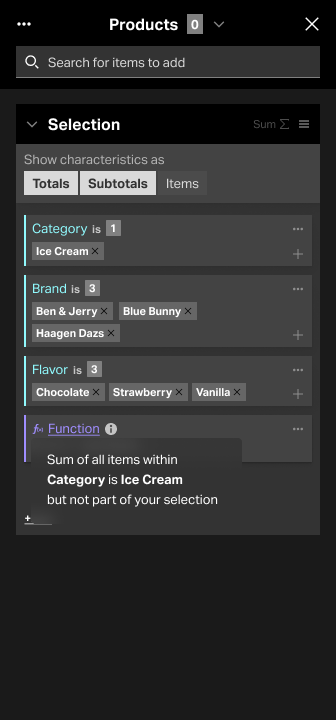
The purple function card separates the comparison operation from the cyan-accented characteristic cards. Its explanation spells out both the included base and the excluded selection.

Explain the operation where it is configured.

The tooltip reads as an analytical statement: items within the Ice Cream category, but not part of the current selection. That distinction gives “others” a boundary.

Comparison rule shown in the designItems within the chosen base
minus items in the current selection.

Category-scoped comparison with an explanation at the point of configuration.

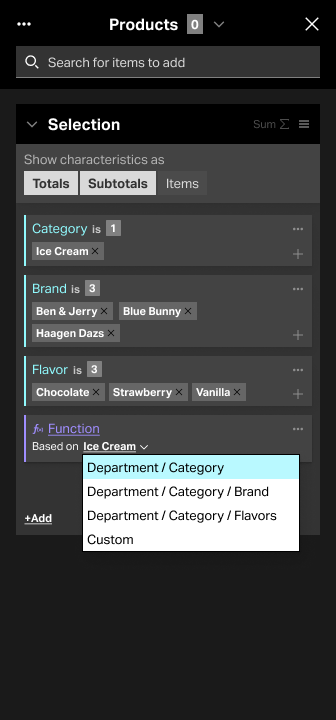
Three ways to express the comparison base

Three labeling approaches explore how to communicate the comparison base: concrete values, characteristic names, and hierarchy paths. Each balances familiarity, compactness, and analytical precision. Compare the alternatives below.

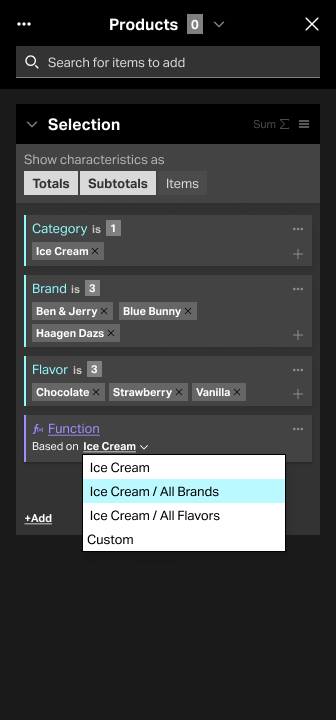
Function menu with Ice Cream, Ice Cream / All Brands, Ice Cream / All Flavors, and Custom.

Lead with the selected value.

“Ice Cream / All Brands” connects the scope to the category already visible in the selection. The language is concrete, although longer values and multi-category selections would need careful handling.

Decision to examineHow well does a value-based label scale when the selection contains multiple categories or long names?

Value-based scope labels.

AlternativeWhat it makes visibleTradeoff to evaluate
Value-basedThe concrete category, such as Ice Cream.Long values and multiple categories can make the label grow.
Characteristic-basedThe participating dimensions, such as Category and Brand.The selected values must be inferred from the cards above.
Hierarchy-basedThe parent-child path, such as Department / Category.More context also introduces more terminology.

Category base

Interpretation before expanding the base.

Tooltip stating: sum of all items within Category is Ice Cream, but not part of your selection.
The explanation identifies the category and excludes the current selection.

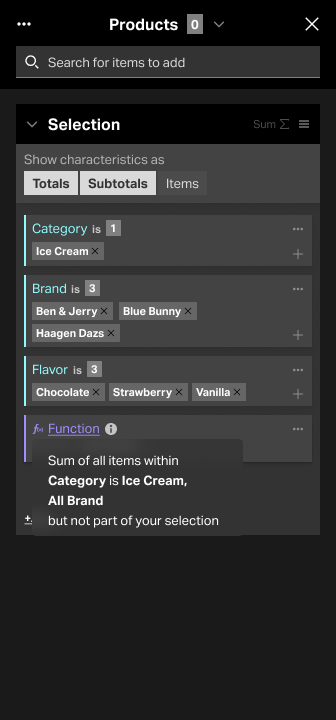
Category and all brands

The base explanation becomes more explicit.

Tooltip stating: sum of all items within Category is Ice Cream, All Brand, but not part of your selection.
The expanded base includes all brands while preserving the exclusion statement.

The small panel carries a larger system.

Modernization extends beyond the comparison menu. The experience also needs to communicate aggregation, linked definitions, recovery, and dependencies so analysts can understand the consequences of a change.

Stable prompt controls

Keep the header fixed while the content scrolls. The prompt name, output count, menu, selector, close action, and search remain in a predictable location. The prompt output counter remains distinct from the counts on individual characteristic cards.

Local aggregation rules

Show the relationship between SUM and display options. Totals, Subtotals, and Items are available when SUM is inactive or unavailable; when SUM is active, those options are hidden. The control states are part of the selection’s meaning.

Explicit updates

Separate the saved definition from a modified instance. Changes to an instance do not automatically update the saved selection. “Push Changes” updates the saved definition and unchanged linked instances; other modified instances remain unaffected.

Recoverable selections

Make invalid values and dataset changes visible. Unavailable values and unavailable characteristics need distinct recovery choices: fix a selection, apply defaults, cancel a dataset change, or remove missing selections where appropriate.

Protected dependencies

Make a share basis explicit before it affects a fact. The fact-dependency flow includes selecting a basis and warning when a selection used as that basis is deleted. This is related system behavior, separate from the “All Others” function.

The interaction details behind the modernization.

The detailed interaction designs connect visible controls to the system’s behavior. Explore the panel structure, comparison model, saved-selection relationships, and recovery paths below.

Panel anatomyFixed controls, scrolling content, and selection group responsibilities.
Comparison behaviorAdd entry, function card, explanation, and base options.
Saved selection relationshipsHow changes propagate and where links break.
Validation and recoveryMissing data, warnings, and recovery choices.
Dependent factsChoosing a basis and handling deletion safely.

A clearer model for complex selections.

The design brings selection structure, comparison scope, and system behavior into one readable model. Grouped controls and contextual explanations make the analytical rules easier to inspect where decisions happen.

The modernization direction connects small interface decisions with larger system consequences: what a comparison includes, how an update propagates, and how an analyst recovers when data changes.

Interaction design detail